
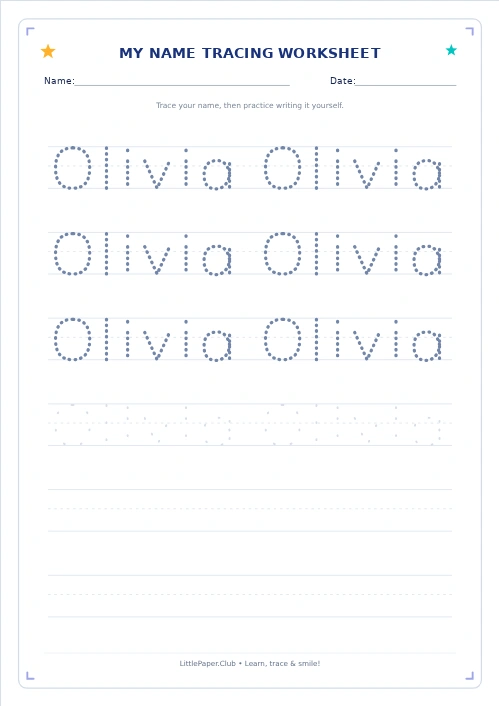
The Handwriting Generator makes handwriting practice personal with the LittlePaper.Club name tracing generator. Our Handwriting Generator helps parents and teachers create name tracing worksheets for preschool, kindergarten, and early elementary learners. The name tracing generator helps families create name tracing worksheets together. Use the name tracing generator to create name tracing worksheets.
Read more about the Name Tracing Generator
Create Name Tracing Worksheets in Minutes
The Handwriting Generator makes a familiar name feel meaningful. With this name tracing generator, children can practice the letters they see every day rather than copying unrelated words. Use the Handwriting Generator to create name tracing worksheets with large letters for beginners or smaller letters for confident writers. Choose the name tracing generator to create name tracing worksheets.
How to Use the Name Tracing Generator
- Type a name, word, or short phrase into the name tracing generator.
- In the Handwriting Generator, choose letter case, style, and practice lines.
- Choose A4 or US Letter in the Handwriting Generator.
- Print the preview or save it as a PDF.
- Return whenever you need to create name tracing worksheets with a different name or difficulty level.
The name tracing generator offers dotted letters, lighter guide letters, and practice lines to support different stages of learning. With the Handwriting Generator, you can create name tracing worksheets that match a child's progress instead of relying on one fixed template. Try the name tracing generator to create name tracing worksheets.
Name Tracing for Preschool and Kindergarten
For ages three to six, use the Handwriting Generator with a short name and generous spacing. The name tracing generator can help children notice letter order and build familiarity with the shapes of letters. When you create name tracing worksheets for preschoolers, choose a larger size and fewer lines to avoid overwhelming the page. The Handwriting Generator lets you adjust the layout as confidence grows. Open the name tracing generator to create name tracing worksheets.
Handwriting Practice for Older Kids
Older children can try smaller letters and short sentences. The name tracing generator is useful beyond first-name practice: try a surname, a classroom vocabulary word, or a simple greeting. Use the Handwriting Generator to create name tracing worksheets with a mix of tracing and independent writing.
Customize Your Printable Worksheet
Adjust the Handwriting Generator options before printing. The name tracing generator supports different text inputs, letter sizes, and worksheet arrangements. The Handwriting Generator shows a live preview, so you can check spacing, readability, and line count. To create name tracing worksheets for multiple children, update the text and generate a new sheet for each student. Adjust the name tracing generator to create name tracing worksheets.
Frequently Asked Questions
Is the name tracing generator free?
Yes. The name tracing generator can be used to prepare printable practice at no cost. Choose the name tracing generator to create name tracing worksheets. You can create name tracing worksheets repeatedly without creating an account.
Can I use the Handwriting Generator for words other than names?
Yes. The Handwriting Generator accepts names, individual words, and short phrases. You can create name tracing worksheets for spelling practice, classroom vocabulary, or a child's favorite words.
Can I print on A4 and US Letter?
Yes. Select the paper size in the Handwriting Generator before printing. The name tracing generator previews the page so you can check it and create name tracing worksheets suitable for your printer.
What age is the name tracing generator for?
The name tracing generator works well for preschool, kindergarten, and children who need extra handwriting practice. When you create name tracing worksheets for younger learners, use bigger letters and fewer rows. The Handwriting Generator also allows more challenging settings for older kids.
Do I need to download an app?
No. Open the name tracing generator in your browser, enter the text, and use the print or PDF option. The Handwriting Generator runs in the browser, making it simple to create name tracing worksheets whenever you need them.
Make Every Practice Page Personal
Open the name tracing generator, pick a comfortable layout, and create name tracing worksheets that fit today's lesson. Use the name tracing generator to create name tracing worksheets. The Handwriting Generator gives you a practical way to repeat familiar letters, introduce new words, and celebrate gradual progress. Use the name tracing generator when lessons need fresh examples.